Page en Attente
Shake Me
Stimulez et interagissez
Généralités
- Adserver régie utilisé : SmartClip
- Délai de réception des éléments techniques : 3 jours minimum avant le lancement de la campagne.
- Contextualisation du format : Invitez l’auditeur à secouer ou à taper sur son smartphone ou montre connectée pour déclencher une action.
Guide lines creation vidéo
Déclenchement de l’action pendant la publicité puis encore 10 secondes après la fin de la vidéo.
- Que doit faire l'auditeur : "Secouez votre téléphone"
- Quand doit-il le faire : Ajout d'une référence temporelle dans la création puis la répéter à mi-parcours. "Regardez maintenant"
- A quoi doit-il s'attendre : "Télécharger un coupon" ou "Ouvrir notre site web"
Livrable
- Création audio
- Type : .mp3 / .wma / .aac
Actions à déclencher
- Redirection de l'auditeur vers une adresse web
- Livrable smartphone / montre : Fournir un numéro de téléphone (pré remplissage par la vibration)
- Passer un appel
- Livrable smartphone / tablette : URL
- Téléchargement d'un coupon
- Livrables smartphone / tablette : URL / URL de l'imag de secours pour les utilisateurs Android et les tablettes / Coupon au format .pkpass (QR Code inclus)
Android: Pour accéder au coupon, l'auditeur doit avoir une application de portefeuille déjà installée ou Télécharger un de Google Play (par exemple, PassWallet En l'absence de l’application, l'image de secours (précédemment téléchargée dans AudioMatic sera automatiquement enregistrée dans leurGalerie d'images
iOS : Sur les appareils iOS ( iPad), le fichier pkpass sera ajouté au fichier Préinstallé Portefeuille Apple
Shake Me
Shake and Interact
General Information
- Ad server used: SmartClip
- Deadline for receiving technical assets: Minimum 3 days before the campaign launch.
- Format contextualization: Encourage listeners to shake or tap their smartphone or smartwatch to trigger an action.
Video Creation Guidelines
The action trigger must remain active during the ad and for 10 seconds after the end of the video.
- What should the listener do: "Secouez votre téléphone" ("Shake your phone")
- When should they do it: Add a time cue in the creative and repeat it halfway through. "Regardez maintenant" (“Look now”)
- What should they expect: "Télécharger un coupon" (“Download a coupon”) or "Ouvrir notre site web" (“Open our website”)
Deliverables
- Audio Creative
- Formats: .mp3 / .wma / .aac
Actions to Trigger
- Redirect the listener to a website
- Smartphone / smartwatch deliverable: Provide a phone number (auto-filled through the vibration feature)
- Make a phone call
- Smartphone / tablet deliverable: URL
- Download a coupon
- Smartphone / tablet deliverable: URL / Backup image URL for Android users and tablets / Coupon in .pkpass format (QR code included)
Android: PTo access the coupon, the listener must already have a wallet application installed or download one from Google Play (for example, PassWallet).
If no application is installed, the backup image previously uploaded to AudioMatic will automatically be saved to their image gallery.
iOS : On iOS devices (including iPad), the .pkpass file will be added directly to the pre-installed Apple Wallet app.
6Break
Généralité
- Adserver régie utilisé : DFP (Google/ Doubleclick)
- Délai de réception des éléments techniques : 5 jours ouvrés avant le lancement de la campagne
- Formats technologiques : png, gif ou jpeg
- Contextualisation du format : Le message diffusé doit être contextualisé à un moment de pause (exemple « Fondez pour une pause LINDOR »).
Livrables
| Device | Formats | Taille | Poids | Type |
|---|---|---|---|---|
| Desktop | Horizontal | 600x400 | < 400 ko | jpeg | png | gif |
| Mobile | Vertical | 300x600 | < 400 ko | jpeg | png | gif |
Formats
Display
Side View
Généralités
Adserver régie utilisé : Freewheel
Délai de réception des éléments techniques : Jusqu’à 5 jours avant le lancement de la campagne
Contextualisation du format : Format display qui s’intègre en parallèle de la diffusion de programmes [15 mn ou sur M6+ en catch up et permet de renvoyer l’internaute vers votre site web
Mise en avant de la Side View
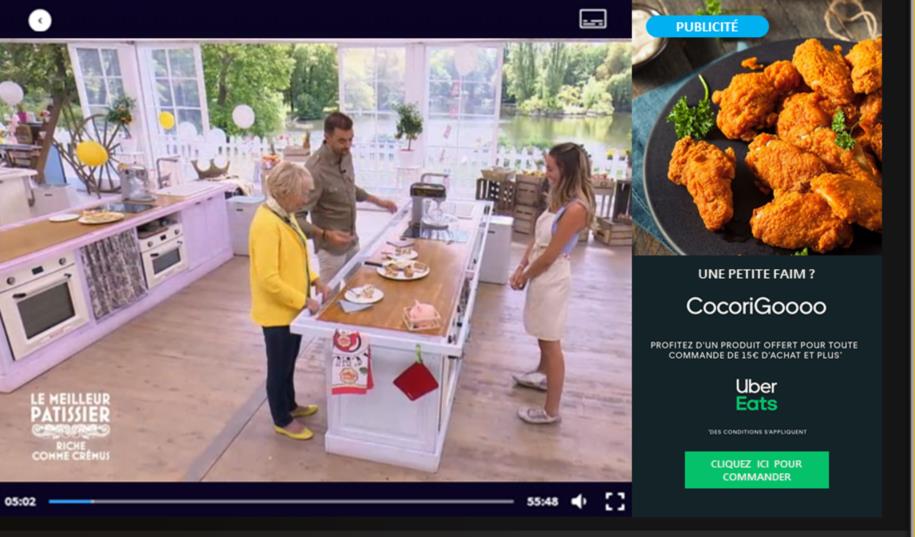
Affichage 2 mm après le début du pré-roll
- Affichage en parallèle du programme (à droite)
- Ne perturbe pas l’UX player redimensionné
- Cliquable
Formats
| Format | Taille | Poids | Type |
|---|---|---|---|
| Desktop | 512x1024 | < 400ko | JPEG |
NB : Intégration de la mention Publicité et du bouton de fermeture directement dans le player
Livrable traffic
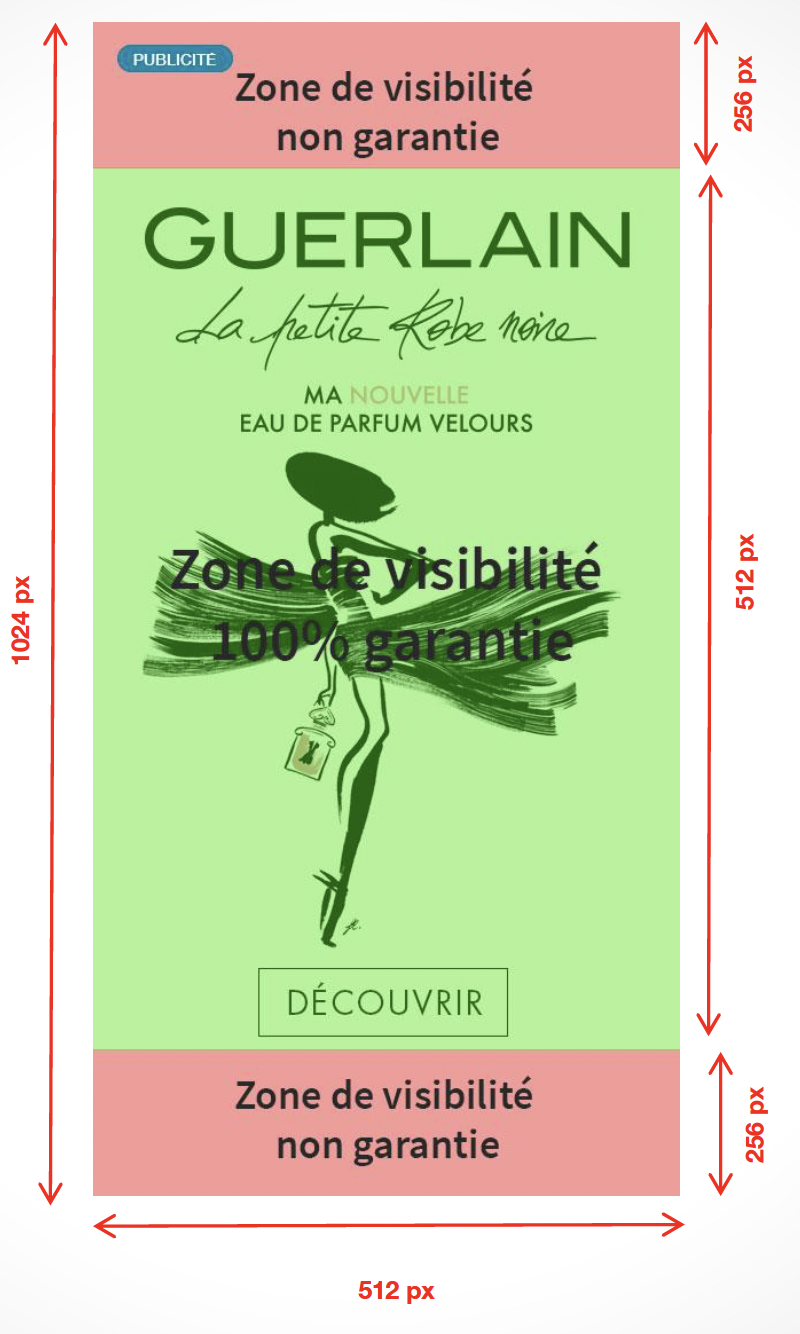
Source PSD
https://cloud.m6.fr/index.php/s/wqD1N3zs1VjsNBl
6Break
General Information
- Adserver used : DFP (Google/ Doubleclick)
- Deadline for receiving technical assets: : 5 business days before campaign launch
- Formats: png, gif ou jpeg
- Format contextualization: The advertising message must be contextualized around a break or pause moment (e.g., “Melt into a LINDOR break”).
Deliverables
| Device | Formats | Size | Weight | Type |
|---|---|---|---|---|
| Desktop | Horizontal | 600x400 | < 400 ko | jpeg | png | gif |
| Mobile | Vertical | 300x600 | < 400 ko | jpeg | png | gif |
Formats
Display
Side View
General Information
Ad server used: Freewheel
Deadline for receiving technical assets: Up to 5 days before the campaign launch
Format contextualization: Display format integrated alongside program broadcasting (15-minute formats or catch-up content on M6+) allowing users to be redirected to your website.
Side View Highlight Features
Display appears 2 minutes after the start of the pre-roll
- Displayed alongside the program (right-hand side)
- Does not disrupt the user experience thanks to a resized player
- Clickable format
Formats
| Format | Size | Weight | Type |
|---|---|---|---|
| Desktop | 512x1024 | < 400ko | JPEG |
Note: The “Advertisement” label and close button must be integrated directly into the player.
Traffic Deliverables